Personal and service tokens
API tokens for people and service accounts, with a 90-day lifetime cap by default and the holder’s permissions.
VICTOR PRODUCT / API & AUTOMATION
Provision and operate Victor through its public API, command line, Terraform, Ansible and MCP. Your automated workflows use the same permissions, durable tasks and audit history as the web interface.
Community · every interface uses the same API01 / THE API
Victor’s API uses the Connect protocol: every call is a JSON POST, so curl works for everything but the two watch streams. An OpenAPI document describes each operation with a stability level, and labels Enterprise operations.
Inventory changes go through a single action call. Send a request ID and a retry within 24 hours returns the original task instead of doing the work twice.
curl -sS "$VICTOR_URL/victor.v1.TaskService/RunAction" \
  -H "Authorization: Bearer $VICTOR_TOKEN" \
  -H 'Content-Type: application/json' \
  -d '{"action":{"powerOff":{"vmId":"vm-1"}}}'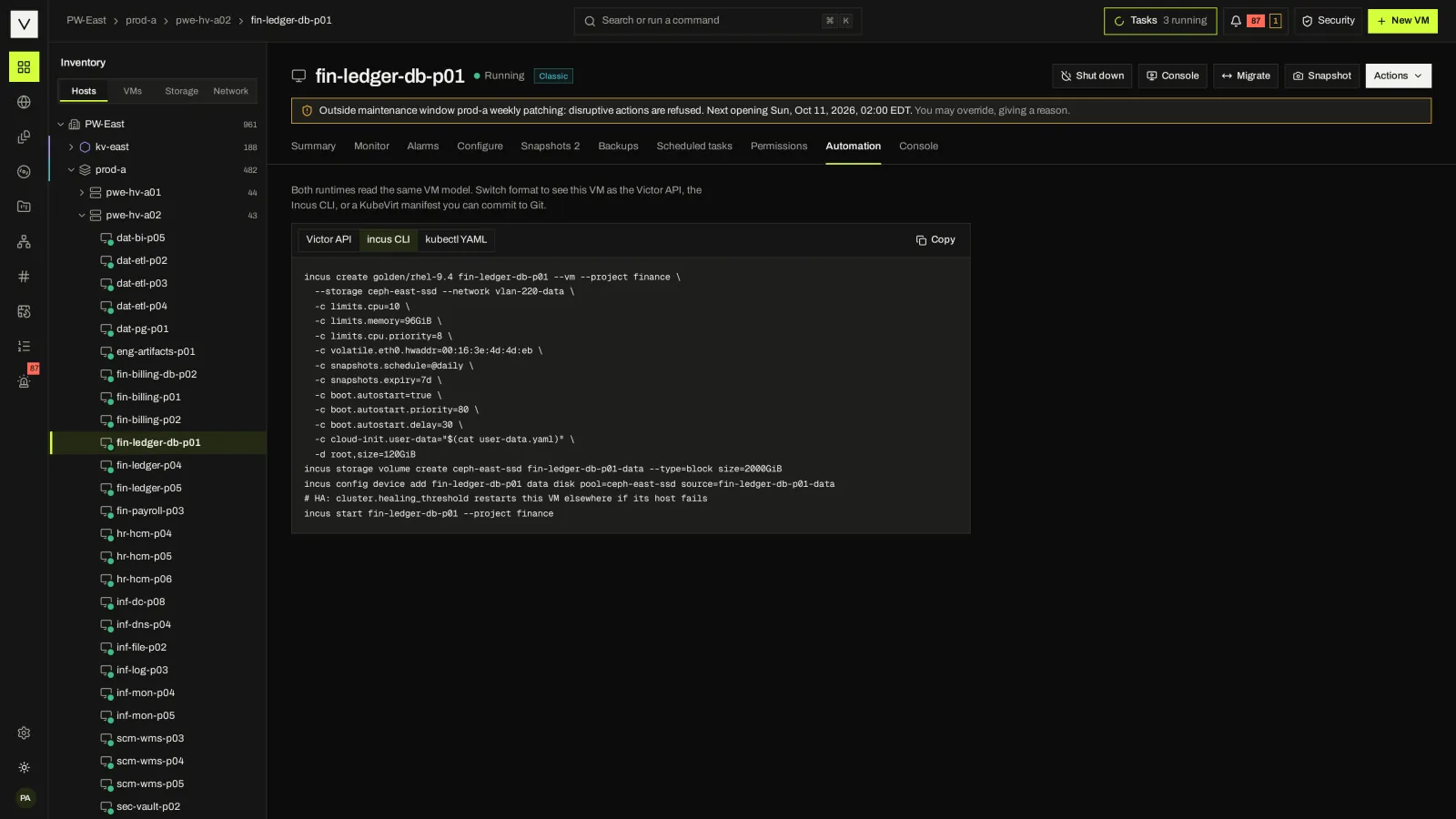
02 / VICTORCTL
A static binary for Linux, macOS and Windows on amd64 and arm64, with a FIPS build and no telemetry. Find objects by name, inventory path, ID or tag, and script against predictable exit codes.
Each VM’s Automation tab shows the same VM as a Victor API call, an engine command or a KubeVirt manifest, ready to copy.
victorctl login https://victor.example --ca-file victor-ca.pem
victorctl get vm --path '/East/vm/Production/*' --tag pci
victorctl vm create web-01 --cluster cl-a --template debian/12 \
  --cpu 2 --mem 4 --disk 40
victorctl vm power off web-dev-01 --wait
03 / TERRAFORM AND OPENTOFU
The victor provider manages VMs on KVM clusters or KubeVirt, templates, snapshots, networks, IP pools, ACLs, roles, permissions, schedules, change windows, placement, DRS, HA, capacity, backup and migration plans.
It ships as a filesystem mirror in the release and air-gap bundle. Sysprep is not supported yet; use cloud-init.
resource "victor_vm" "web" {
  name             = "web-01"
  runtime          = "classic"
  template_id      = data.victor_template.ubuntu.id
  cluster_id       = data.victor_cluster.a.id
  datastore_id     = data.victor_datastore.ssd.id
  folder           = "Production/Web"
  num_cpus         = 4
  memory           = 8192 # MiB
  network_interface = [
    { network_id = data.victor_network.app.id },
  ]
  cloud_init = file("${path.module}/web.cloud-init.yaml")
  tags       = ["web", "prod"]
}
04 / ANSIBLE
The victor.core collection has modules, an inventory plugin and Event-Driven Ansible support. It can authenticate with workload identity, so a playbook in a pipeline needs no stored token.
Not yet certified for Automation Hub.
- name: Patch window
  hosts: localhost
  module_defaults:
    group/victor.core.victor:
      server: https://victor.example.com  # token from $VICTOR_TOKEN or workload identity
  tasks:
    - name: Production databases
      victor.core.vm_info:
        name: db-prod-*
        tags: [prod]
      register: dbs
    - name: Snapshot each first
      victor.core.vm_snapshot:
        id: "{{ item.id }}"
        snapshot_name: pre-patch
        quiesce: true
        expires_in_days: 7
      loop: "{{ dbs.vms }}"
05 / MCP FOR AI ASSISTANTS
Victor can serve the Model Context Protocol at /mcp. It is off by default, and write tools need a second switch. Assistants use API tokens only, every call is audited, and destructive tools ask the person to confirm when the client supports it.
{
  "mcpServers": {
    "victor": {
      "type": "http",
      "url": "https://victor.example.com/mcp",
      "headers": { "Authorization": "Bearer vic_pat_…" }
    }
  }
}
06 / CREDENTIALS FOR MACHINES
API tokens for people and service accounts, with a 90-day lifetime cap by default and the holder’s permissions.
Exchange a Kubernetes service-account token, or an access token from your identity provider’s client-credentials grant, for a Victor token that lives at most 15 minutes.
victorctl can sign in through the browser with a device code, including single sign-on.
FAQ
Supported calls do, through the vSphere bridge. Community covers reads and power operations; Enterprise adds documented writes. Plan to move long-lived automation to Victor’s own API, CLI or Terraform provider. #
Not yet. It ships as a filesystem mirror with each release and in the air-gap bundle. #
Yes. Watch tasks through the API, forward events by webhook, syslog, email or Loki, or read the change feed, a typed stream of VM lifecycle changes for integrators. #
Not yet. It is planned. PowerCLI works through the vSphere bridge for supported calls. #
NEXT STEP
Tell us what you run today. We will show you the workflows that matter to your team.