Available
Offline assessment, vCenter scan, plans, cold migration with identity preserved (Community, Linux, one VM per call). Waves, virt-v2v, test boot, cutover and rollback (Enterprise).
VICTOR SOLUTIONS / VMWARE EXIT
Assess your VMware estate, plan its destination and move workloads into your Victor virtualization platform. Review pre-flight findings, follow each migration task and retain the records your team needs for cutover and recovery.
Cold migration today · tested against a vCenter simulator · validate in your estate01 / THE WORKFLOW
The assessment runs offline from an RVTools export, without a Victor server, so you can size the destination before installing anything.
Read an RVTools export or scan vCenter. Pre-flight rules flag RDMs, shared disks, snapshots, passthrough, Fault Tolerance, encryption, likely domain controllers and duplicate BIOS UUIDs. Sizing proposes hosts at N+1 and Ceph capacity.
Add vCenter as a source. Its password is sealed, and Victor only reads: nothing in vCenter changes.
Map port groups to networks, datastores to pools, folders to folders and resource pools to projects or namespaces. Plans export as YAML for review in Git.
Export, convert, import, create, boot and verify, as one task that resumes across a control-plane failover. The source VM is never deleted.
victorctl migrate assess estate.xlsx      # every VM: ready, info, warn or block
victorctl migrate assess estate.xlsx --summary --host-cores 96 --host-memory 1024
victorctl migrate source add vcsa-east --vcenter https://vcsa.example.com \
-u svc-migrate@vsphere.local --vcenter-ca-file vmca.pem
victorctl migrate plan create wave-1 --source vcsa-east --cluster cl-a \
--map-network 'VM Network=vlan-204-web' --map-datastore datastore1=ceph-ssd \
--vm web-01 --vm web-02
victorctl migrate plan validate wave-1
victorctl migrate start wave-1 --vm web-01 --wait02 / CHOOSE YOUR PATH
Pick the situation closest to yours. This changes the explanation on the page only.
Run the assessment offline against an RVTools export. It needs no Victor server and produces a report of blockers, warnings and the hosts and storage the destination needs.
03 / IDENTITY
Licensing servers, configuration management and monitoring often key on identifiers that change in a naive copy. Victor keeps them, and checks each guest’s network configuration before it moves.
For Linux guests Victor writes the network configuration your distribution uses, and pins old interface names such as ens192 so scripts keep working.
| Identity | Kept |
|---|---|
| Managed object ID | A new Victor ID; the plan records which source VM it came from. Scripts can still find the VM by its kept BIOS or instance UUID |
| BIOS UUID and instance UUID | Yes |
| MAC addresses | Yes |
| VM Generation ID | On KVM clusters; KubeVirt has none |
| IP configuration | Auto, keep, DHCP, from a pool, or leave as is. Guests defining bonds, bridges or VLANs must use leave. Keeping a Windows guest’s static addresses needs Enterprise |
| Tags, attributes and notes | Not carried over yet |
04 / VICTOR ENTERPRISE
Group work into waves and start them together. virt-v2v injects VirtIO drivers and removes VMware Tools, and a guest script reapplies Windows static IPs. Windows conversion is designed to run unattended but has been tested with stand-ins so far, so validate Windows guests in your environment.
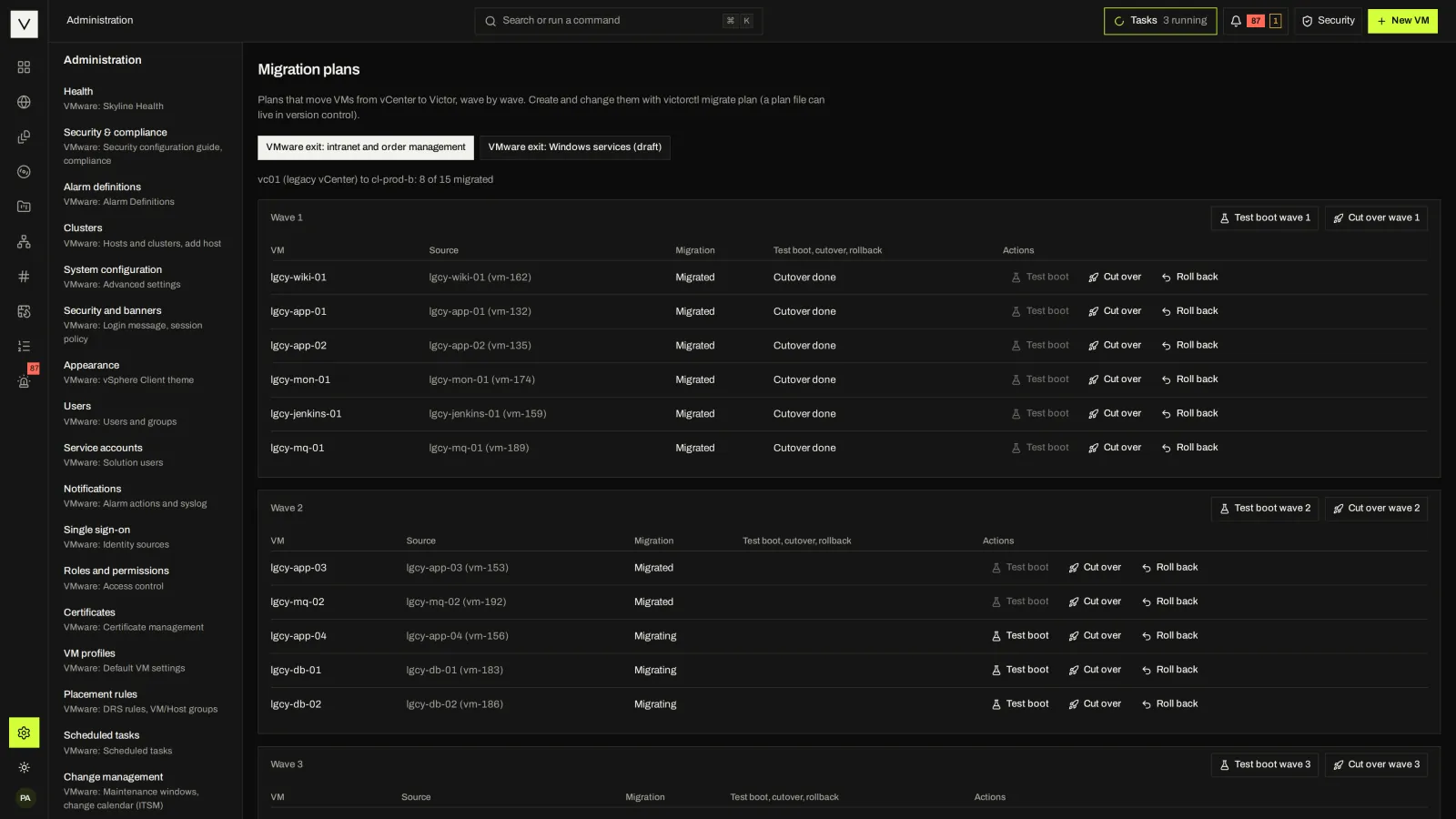
Test-boot a copy in an isolated network with agent, TCP or script checks. Cut over in a window with pre and post hooks, and roll back by powering the vCenter source on again.
Plans are created with victorctl or Terraform; the console shows plans and runs test boot, cutover and rollback. Test boot runs on KVM clusters only.
05 / VSPHERE API BRIDGE
Turn on the bridge and Victor answers the vSphere SOAP and REST APIs, identifying as vCenter Server 8.0.3. govc, PowerCLI, pyVmomi, Ansible’s VMware collections, Packer and the Terraform vSphere provider can keep working for supported calls. Unsupported calls fail with a clear fault.
| Area | Community | Enterprise | Not supported |
|---|---|---|---|
| Inventory and properties | All reads, the property collector and WaitForUpdates | Same | Custom attributes |
| Power and hosts | Power on, off, reset, suspend, guest shutdown and reboot; host maintenance mode | Same | Host configuration |
| VM changes | Answer: an Enterprise feature | Create, clone, reconfigure, destroy, rename, move, mark as template | UpgradeVM |
| Snapshots and migration | Reads | Snapshots; compute migration and relocation | Storage vMotion through relocate |
| Tags and guest | Tag reads, guest reads, performance data | Tag writes, guest exec and file uploads | Guest operations on KubeVirt |
| Other | Events, tasks, sessions | Same | Content Library writes, distributed switches, vSAN, SSO admin |
export GOVC_URL=https://victor.example.com/sdk
export GOVC_USERNAME=alice GOVC_PASSWORD=…
govc vm.info -json web-01Connect-VIServer -Server victor.example.com
Get-VM -Name web-01 | New-Snapshot -Name pre-changeA generated conformance suite runs pinned clients (govc 0.56, PowerCLI 13.3, Terraform vSphere provider 2.12.0, Packer plugin 2.5.0) against the bridge: 141 checks pass in Community and 227 in Enterprise, with none failing. The bridge is a migration aid, not a second product API; validate each script against the operation matrix.
06 / CURRENT SCOPE
Be clear about what is available now, so the runbook you write is one you can execute.
Offline assessment, vCenter scan, plans, cold migration with identity preserved (Community, Linux, one VM per call). Waves, virt-v2v, test boot, cutover and rollback (Enterprise).
Sources, scans and cold migration are proven against a vCenter simulator. Real vCenter 7 and 8 and standalone ESXi exports need validation in your environment, and Windows conversion has not yet run end to end (virt-v2v and the Windows network script are tested with stand-ins).
Warm migration with changed-block tracking, migration reports, OVA/OVF import and adopt-in-place. There is no downtime target to quote today.
FAQ
Not during assessment or scanning. Cold migration reads and exports, and shuts a running source down only if the plan sets power-off-source. Enterprise test boot takes and removes a temporary snapshot, cutover shuts the source down, and rollback powers it back on. The source is never deleted. #
Enterprise converts Windows guests with virt-v2v, injecting VirtIO drivers and reapplying static IPs. Community’s cold path converts Linux guests. Windows conversion has so far been tested with stand-ins, and Secure Boot re-enrollment is open, so validate Windows guests before planning a window. #
Yes. Migration is per VM or per wave, the source is never deleted, and the vSphere bridge lets supported tools address Victor while the rest of the estate stays on vCenter. #
Victor has no vSAN equivalent or distributed switches. Plan storage on Ceph, NFS or local pools, and networks as bridge, VLAN or OVN networks. The assessment flags VM features without a direct mapping (RDMs, shared disks, passthrough, Fault Tolerance, vSphere encryption, nested resource pools); it does not assess vSAN, NSX or distributed switch configuration. #
NEXT STEP
Tell us the source versions, VM mix and constraints. We will show the current migration path and its limits.